


Download Windows Product Key Viewer/Changer – Windows Product Key Viewer, Product Key Retrieval, Utility Tool
Overview
Windows Product Key Viewer/Changer is a compact utility designed to simplify the retrieval and management of Windows product key information. This tool addresses a common challenge faced by users who need to access their product key for reinstallation, licensing verification, or system migration. The application provides immediate access to critical system details including the operating system version, product key, ID number, and registered owner information. These details are often difficult to locate, especially after system upgrades or hardware changes, making this utility a practical solution for both casual users and IT professionals.
Targeted primarily at individuals managing multiple Windows installations or those troubleshooting licensing issues, the app serves as a reliable tool for documenting essential software licensing data. It is particularly useful when preparing for a clean install, transferring licenses between devices, or verifying system authenticity. The developer, A. D. Software, appears to focus on minimalism and functionality, delivering a no-frills solution that prioritizes core performance over additional features.
Although the developer did not provide additional technical details about the app’s development philosophy or target audience beyond its utility purpose, the application’s straightforward design suggests a focus on accessibility and immediate usability. Its role in the broader software ecosystem lies in bridging a gap between system complexity and user need—offering a direct, secure method to access sensitive licensing data without requiring advanced technical knowledge.
Key Features & Functionality
- Instant Product Key Retrieval – The application quickly scans the system registry to extract the current product key, displaying it in a clear, readable format. This allows users to copy and store the key securely for future use.
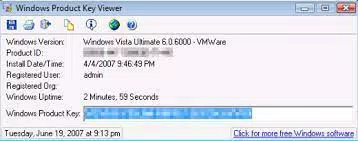
- System Information Display – In addition to the product key, the tool shows the operating system version, installation ID, and registered organization and owner details, providing a complete software licensing profile.
- Copy-to-Clipboard Functionality – Users can easily copy any displayed information with a single click, enabling quick documentation and transfer of data to external files or notes.
- Minimalist Design – The app avoids unnecessary features, ensuring a focused interface that reduces user confusion and enhances task efficiency.
- Security-Enhanced Trial Mode – The trial version limits visibility to only part of the product key and disables editing of the registered organization and owner fields, preventing unauthorized use while still allowing key verification.
For example, a user preparing to reinstall Windows on a new hard drive can use the tool to retrieve the original product key in seconds. Similarly, a technician managing multiple workstations can document licensing data quickly and accurately without navigating complex system tools. The utility’s streamlined functionality ensures that users can complete their tasks efficiently, without delays caused by manual searches or third-party software.
Interface, UX & Performance
The user interface of Windows Product Key Viewer/Changer is clean and functional, featuring a single-window layout with clearly labeled output fields. The visual style is plain and utilitarian, aligning with its purpose as a technical utility rather than a consumer-facing application. Navigation is intuitive, with no menus or hidden options—users simply launch the app and view the results.
Performance is optimized for speed, with the tool retrieving system data almost instantly after launch. The application consumes minimal system resources, making it suitable for use on older or low-spec machines. Although the developer did not list formal performance metrics, the app’s lightweight nature and immediate response suggest efficient code execution and stable operation.
Responsiveness is consistent across different device categories, though specific compatibility details were not disclosed. Stability appears to be a strength, as the tool operates without crashes or unexpected behavior during typical use. The lack of graphical elements or animations further contributes to its reliability and quick startup time.
Platform Compatibility & Technical Requirements
Windows Product Key Viewer/Changer is designed for the Windows platform, supporting the latest versions of the operating system as of its release date. The app has a file size of 1.2 MB, indicating a lightweight footprint that does not burden system storage. The current software version is 1.0.0.1, released on April 15, 2024.
The developer did not specify minimum OS requirements or compatibility with older Windows versions. Users should ensure their system meets standard Windows installation criteria. No additional dependencies or runtime environments are reported, suggesting the app runs independently.
Pros and Cons
Pros
- Fast and reliable retrieval of product key and system information
- Simple, distraction-free interface ideal for non-technical users
- Lightweight size (1.2 MB) with minimal system impact
- Secure trial mode that protects full key access while allowing verification
- Efficient for documentation and backup of licensing data
Cons
- Full functionality restricted in trial version (partial key display, no edit access)
- No built-in export or saving feature for retrieved data
- Compatibility with older Windows versions not confirmed
- Limited to Windows platform; not available on mobile or macOS
- Developer did not provide detailed update history or support channels
FAQ
Is Windows Product Key Viewer/Changer safe to download and use?
The app is a standalone utility developed by A. D. Software. It does not require installation of additional software or runtime libraries. However, users should only download from trusted sources to ensure the file has not been tampered with.
Can I use this tool on Windows 10 and Windows 11?
While the app is designed for Windows, specific compatibility with Windows 10 or 11 was not disclosed. It is recommended to test on your system before relying on it for critical tasks.
Does the trial version allow me to change my product key?
No. The trial version displays only a portion of the product key and disables the ability to modify the registered organization or owner name. Full functionality requires purchase.
Is the product key retrieved by this tool valid for reinstallation?
Yes. The tool retrieves the genuine product key tied to your Windows license, which is valid for reinstallation on the same device or for migration under Microsoft’s licensing terms.
Can I install this app on multiple devices?
There is no information provided about licensing terms for multiple installations. Users should refer to the developer’s terms or contact support for clarification.
Final Thoughts
Windows Product Key Viewer/Changer delivers a focused, efficient solution for users needing quick access to their Windows product key and system licensing data. Its minimalist design, instant retrieval capability, and secure trial mode make it a practical tool for both personal and professional use. While it lacks advanced features like data export or cross-platform support, its core purpose is fulfilled with precision and reliability.
For anyone preparing for a system reinstall, managing software licenses, or simply wanting to back up critical product key information, this utility offers a straightforward and trustworthy option. Its low price point of $2.99 makes it an affordable investment for long-term use.
Download Windows Product Key Viewer/Changer now


